
Managing Remote Work Eligibility at Job Code and Position Level

Remote work has become a permanent part of the modern workforce. With PeopleSoft HCM Update Image 51, Oracle introduces a much-needed enhancement that allows organizations to control remote work request types based on Job Code or Position eligibility. This new feature empowers HR teams to align remote work policies with business needs while maintaining flexibility and compliance.

Remote Worker Type Eligibility by Job Code or Position
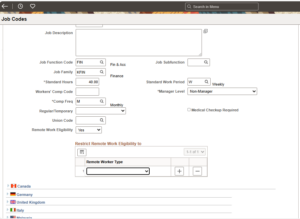
We can now configure remote work eligibility for employees at either the Job Code or Position level. This configuration controls the types of remote work employees can request, offering granular control over workforce flexibility.
Define if a Job Code or Position is eligible for remote work.
- If eligible, specify the available remote work types: Hybrid, Fully Remote or Either
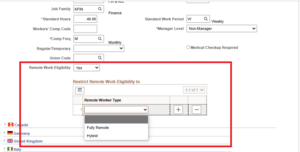
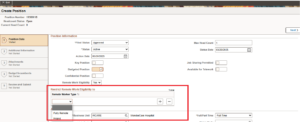
- During the employee’s remote work request, only the allowed remote worker types (configured at Job Code or Position level) will be available for selection.
Key Highlights of the Enhancements:
1. Position Takes Precedence
If eligibility is defined at both the Job Code and Position levels, the system will prioritize the Position-level configuration for determining available remote work options.
Example Scenario:
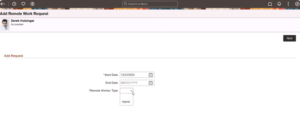
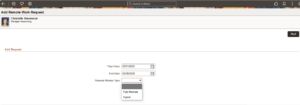
Let’s consider two employees – Derek Holsinger and Christelle Stevenson – who both share the same Job Code. However, only Christelle is linked to a Position.
Job Code Eligibility Setup:
- Remote Worker Type Allowed: Hybrid Only
- Position Eligibility Setup (for Christelle only): Remote Worker Type Allowed: Hybrid or Fully Remote
Outcome:
- Derek Holsinger (No Position assigned): Can only request Hybrid remote work, as per the Job Code configuration.
- Christelle Stevenson (Position assigned): Can request Hybrid or Fully Remote work because her Position-level setup overrides the Job Code restriction.
2. Override Remote Worker Configuration
- There’s also flexibility for specific scenarios:
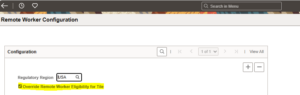
- By enabling the “Override Remote Worker Configuration” option, organizations can allow employees to access the Remote Worker tile and submit any remote worker request, bypassing Job Code and Position eligibility restrictions.
- This is useful for exceptional cases where manual overrides are necessary.
3. Restrict Retroactive Remote Work Requests
To maintain data integrity and prevent backdated requests:
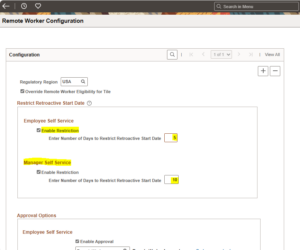
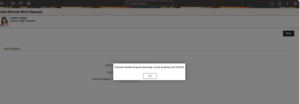
- An “Enable Restriction” option is now available.
- HR administrators can define how many days in the past an employee or manager can enter a remote work request.
- This prevents users from setting a start date prior to the allowed retroactive period, reducing errors and ensuring compliance with internal policies.
Business Benefits:
- Enforces Remote Work Policies Consistently
- Provides Flexibility for Business-Specific Roles or Positions
- Minimize Policy Violations and Manual Corrections
- Improves Data Accuracy with Retroactive Limits
- Empowers Managers and HR to Manage Remote Work Effectively
Conclusion:
The “Control Remote Worker Type by Job Code or Position” enhancement in PeopleSoft HCM Image 51 is a timely update that helps organizations fine-tune their remote work policies. By enabling eligibility controls and retroactive limits, businesses can achieve the right balance between employee flexibility and operational control.
As hybrid and remote work continue to evolve, this PeopleSoft feature positions HR teams to manage remote work requests smarter, not harder.
Author: Nandhini Devi Raman, Junior Associate