
PeopleSoft HCM PUM 49 | Configurable Time Summary to Fluid Timesheet


This blog delves deep into the PeopleSoft HCM Update Image 49 where Oracle introduced the Configurable Time Summary feature to the Fluid Timesheet, enhancing time data management with seamless navigation to improve accuracy and efficiency for users.
Enhancing PeopleSoft HCM with Configurable Time Summary on the Fluid Timesheet
Oracle’s latest update, PeopleSoft HCM Image 49, brings an exciting enhancement to the Fluid Timesheet with the introduction of the Configurable Time Summary feature. This new functionality allows users to navigate seamlessly through various sections of the timesheet, improving efficiency and ease of use. Here’s an in-depth look at what this feature offers and how it can benefit your organization.
Team Time – PeopleSoft Fluid User Interface for Time Management:
The Managers can use the PeopleSoft Fluid User Interface to view team time, manage exceptions, and review employee time reporting locations.
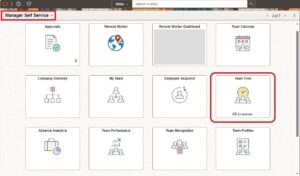
Select the Team Time tile on the Manager Self-Service home page to access a list of PeopleSoft Time and Labor, and PeopleSoft Absence Management manager self-service tasks that you can perform.
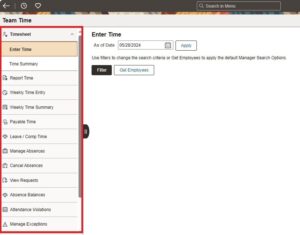
This Team Time start page is a navigation collection that enables the managers to access the frequently used Time and Labor management components from one location. The left panel of this page lists the components collected under 13 categories.
- Timesheet Folder
- Report Time
- Weekly Time Entry
- Weekly Time Summary
- Payable Time
- Leave Balances
- Request Absence
- Cancel Absences
- View Requests
- Absence Balances
- Manage Exceptions
- Reporting Locations
- Workforce Availability
By default, the team time landing right panel is the select employee page. Click on ‘Get Employees’ to display the list of employees with the details for the components selected in the left panel.
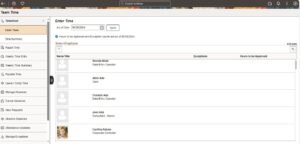
The right panel displays the filter options or the employee list. The manager can select one of the employees on the right panel to view the details.
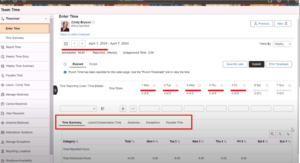
Key Sections of the Configurable Time Summary
The Configurable Time Summary feature integrates multiple critical sections into the Fluid Timesheet interface, providing a comprehensive view of an employee’s time data. Here’s a breakdown of each section and its functionalities:
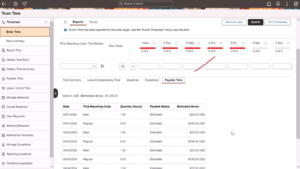
- Time Summary Tab: This tab provides a snapshot of the total number of hours worked by an employee. It is designed to give users a quick and clear overview of their work hours without the need to delve into detailed records.
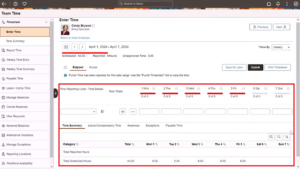
Fig 1.5 Overview of Time Summary Tab for the Employee
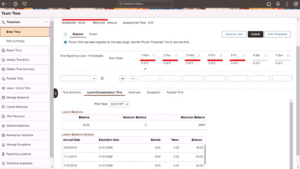
- Leave or Compensatory Time Tab: The Leave or Compensatory Time tab displays the balances of leave and compensatory time as of the chosen date on the timesheet. This section helps employees keep track of their available leave and compensatory hours, aiding in better planning and utilization.
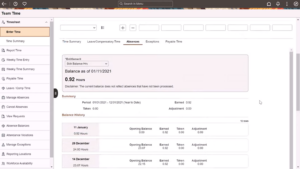
- Absences Tab: In the Absences tab, users can view detailed information about their absence balances. This section is crucial for managing leave requests and understanding the remaining leave balance, ensuring that employees are aware of their entitlements.
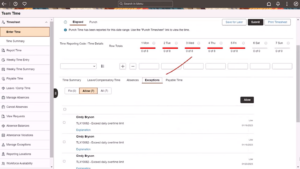
- Exceptions Tab: The Exceptions tab is a powerful tool for examining and managing exceptions. It provides options to review, allow, or remove exceptions, helping managers and employees address discrepancies and ensure compliance with company policies.
- Payable Time Tab: After online rules have been applied, the Payable Time tab allows users to review the details of their payable time. This includes insights into how many hours are eligible for payment, ensuring transparency and accuracy in payroll processing.
How to Achieve Seamless Navigation and Enhanced Usability?
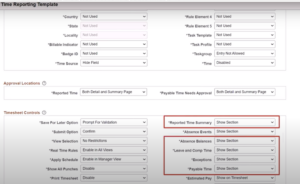
Users can effortlessly switch between different sections, making the process of managing time data more intuitive and less time-consuming. The interface leverages the classic configuration on the time reporting template, ensuring familiarity for users while introducing new efficiencies.
Benefits of the Configurable Time Summary Feature
The introduction of this feature offers several significant benefits:
- By consolidating various time management aspects into a single interface, Managers can quickly access and manage their team time data.
- The detailed views and easy navigation help reduce errors in time reporting and payroll processing.
- With clear visibility of leave and compensatory time balances, Managers can approve their team time off more effectively.
- Managers can efficiently review and address exceptions, ensuring that all-time data complies with organizational standards.
Bottom line
The Configurable Time Summary to Fluid Timesheet feature in PeopleSoft HCM Image 49 is a valuable enhancement that streamlines time management processes. By providing comprehensive, easy-to-navigate views of work hours, payable time, leave balances, absences, and exceptions, this feature empowers both employees and managers to handle time data with greater accuracy and efficiency. As organizations continue to evolve, such advancements in PeopleSoft HCM ensure that time management remains a smooth and hassle-free experience.
Stay updated with the latest PeopleSoft HCM features to make the most of these innovative tools and enhance your organizational efficiency.
Author: Nandhini Devi Raman, Oracle PeopleSoft Consultant