
Enabling Metrics in Requisition Overview | Oracle Fusion Recruiting Cloud

Oracle Fusion Recruiting Cloud is known for being a robust, user-friendly, and all-in-one solution for recruiters to manage enterprise hiring efficiently. ORC provides many dashboards for broad analysis of recruiting data, such as recruiting at a glance, and campaign dashboards. With the 23A release, Oracle provides another dashboard to analyze the applicant’s data in a requisition. The Metrics in the requisition overview page provide the analysis of the applicant’s phases, source, and candidate type analysis.
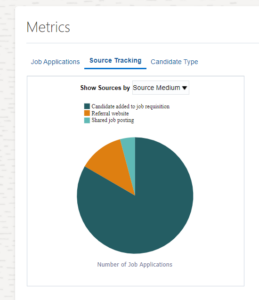
The overview metrics contain three tabs:
- Job Applications: This tab contains the detail of the phases of all the candidates in the requisition. It can be filtered by All Applications, Gender, Ethnicity, and Disability.
- Source Tracking: This tab gives the overall view of sources of hire of the candidates. It can be filtered by Source Medium and Source Name.
- Candidate Type: This tab gives the phase details of the candidates filtered by candidate type. The filters present are All Externals, All Internals, Employees, Contingent Workers, External Candidates, Ex-Contingent Workers, and Ex-Employees.
Enabling the Requisition Overview metrics
To enable the Requisition Overview metrics:
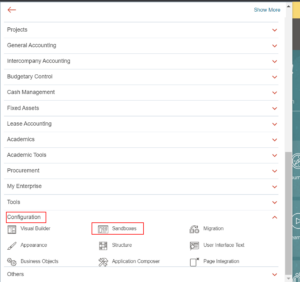
- Click the navigation, open the Configuration drop-down, and select Sandboxes.
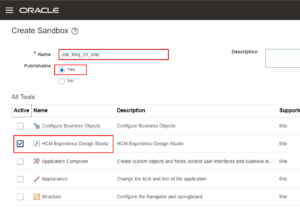
- Click on Create Sandbox.
1. Name: Enter a unique name.
2. Publishable: Keep the sandbox publishable.
3. Select the HCM Experience Design Studio tool.
- Click Create and Enter.
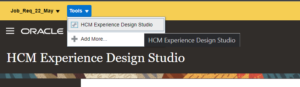
- Click Tools on the top left corner and click HCM Experience Design Studio.
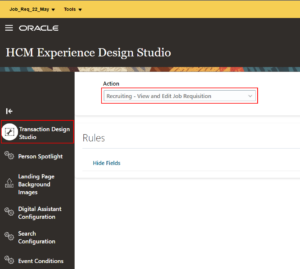
- Click Transaction Design Studio and select Recruiting – View and Edit Job Requisition from the Action drop-down.
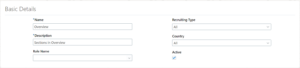
- Click Add and enter the Basic Details.
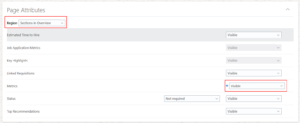
- In the Page Attributes section, set the value of Metrics as Visible.
- Click Save and Close.
- Click the sandbox name from the top left corner and click Publish.
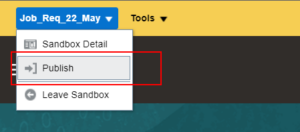
- Click Publish again, and Yes to confirm.
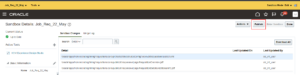
Verifying the Overview metric
After the Job Requisition Overview Metrics section is enabled, open a job requisition with an adequate number of applicants. Open the overview tab to see the Metrics section added.
Limitation: The report loads only when there are more than 20 job applications in the requisition.
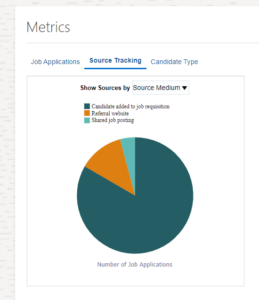
Customizing the Metrics
Sometimes the recruiters want more details than the Oracle-delivered report or totally different data in the report. ORC also provides the option to customize the metrics or replace it different reports. One can customize the Metrics report in the BI publisher or design a new report and replace the path in the requisition page using Sandbox. The custom report must accept requisition ID as a parameter to display the data relevant to the respective requisition.
To customize the report path:
- Create a publishable sandbox with the Page Composer tool.
- Enter the sandbox.
- Navigate to the Metrics section of a requisition.
- Click Tools on the top left corner and click Page Composer.
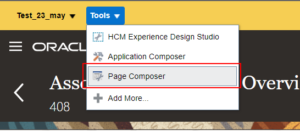
- Click the Structure tab and expand the page structure editor from the bottom of the page. You can also dock the editor on the top, right, or left of the page.
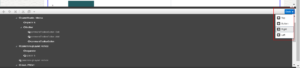
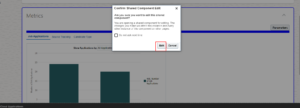
- Hover the mouse over the Metrics section and click the overall highlight. If a confirmation message pops up, click Edit.
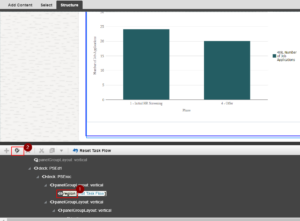
- In the page section editor, select <>region[Edit Task Flow] and click the gear icon.
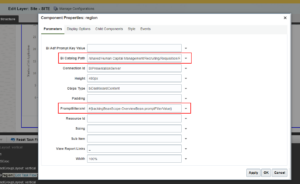
- In the component properties window, Bi Catalog Path contains the BI publisher report path.
Bi Catalog Path: /shared/Human Capital Management/Recruiting/Requisition/Requisition Dashboard/Job Requisition Dashboard
If customization in the report is needed, use the mentioned path to find the report. If you want to replace the report, enter the new BI publisher report path.
Promptfilterxml: #{backingBeanScope.OverviewBean.promptFilterValue}. This is the token to pass the requisition ID to the report.
The Bottom Line
Oracle HCM Cloud services offer organizations a comprehensive solution to manage human capital management needs. With features such as employee management, payroll processing, benefits administration, and talent management, Oracle HCM Cloud is an all-in-one solution that can assist organizations to streamline their HR administrations.
If you are looking for Oracle HCM Cloud services, we are happy to assist you. Our team of experts has extensive experience in implementing and managing Oracle HCM Cloud solutions, and we can help you leverage the full potential of this platform to meet your business needs.
Please feel free to contact us to learn more about our Oracle HCM Cloud services and how we can help you transform your HR operations.
Author: Robinson Ngangom, Oracle HCM Cloud Techno-Functional Consultant